UHR Payslip Kenya: How to Log In, Download, and View Your Payslip Online
Trying to find your UHR payslip but aren’t sure where to log in or how to download it? Many government employees in Kenya face the same issue, especially when they see UHR mentioned online or can’t remember their login details.
Instead of wasting time visiting HR offices and searching through different websites, you can follow a few simple steps to access your payslips online through the UHR payslip login portal at uhr.kenya.go.ke and check your salary details.
In the guide below, we’ll show you how to check your payslip online, download it, reset your password if you’ve forgotten it, and understand the deductions shown on your payslip.
Access Your Account
View Your Payslip
Review deductions and earnings

Easy Download
PDF Format
Secure Access
Protected Portal
Essential Information
What is a UHR Payslip?
A Unified Human Resource payslip is an electronic salary statement associated with Kenya’s Unified Human Resource system and public-service payroll administration. It is also called a GOK payslip.
The broader human resource digitization program is intended to bring employee information and payroll-related processes into a more centralized digital environment. Government publications describe the HRIS Ke/UHR system as a web-based solution that supports human resource and payroll functions across the public service.
Your salary payslip gives you a monthly record of what you earned and what was deducted before arriving at your net salary. For eligible public service employees, this Government of Kenya payslip provides a convenient online record of their salary information.
What Does UHR Stand For?
UHR generally refers to Unified Human Resource.
It forms part of Kenya’s efforts to modernize public service payroll and human resource administration through digital systems. For employees, the system is designed to make access to employment and payroll information more efficient.
Digital Salary Record
View your monthly earnings, deductions, and net salary in one statement.
Government Payslip
An electronic salary statement for eligible Kenya public service employees.
HR & Payroll Information
A convenient digital record of your salary and employment-related information
Eligibility
Who Can Access a UHR Payslip?
UHR-related payroll services are intended for eligible employees whose employment and payroll records are maintained within the relevant Government of Kenya public service HR and payroll system.
However, not every government employee necessarily uses the same payroll platform. Eligible civil servants can use the online payroll services
Some government institutions have their separate HR and payroll arrangements. For example, teachers employed through the Teachers Service Commission can use TSC-specific systems rather than the general public service payroll environment.

Official Government System
Managed by the Ministry of Public Service
Requirements
What Do You Need to Access Your UHR Payslip?
Before you access your salary statement, make sure you have the information associated with your employee account; you need:
Employee or personal number
Registered phone number
Registered email address
Login username
Password
A working internet connection
Smartphone, tablet, or computer
Note:
Never give your password, OTP, National ID information, banking details, or other personal information to someone who claims they can access your payslip for you.
Registration Guide
How to Register for the UHR Payslip Portal
If you are a new public service employee in Kenya, first register your employee account through the Government Human Resource Information System (GHRIS) before accessing your payroll and public service payslip information.
1
Open your web browser and visit the official GHRIS login page:
ghris.go.ke/loginonly.aspx
Pro Tip:
Use a secure internet connection and bookmark this page for easy access in the future. The portal works best in Chrome, Firefox, or Safari.
2
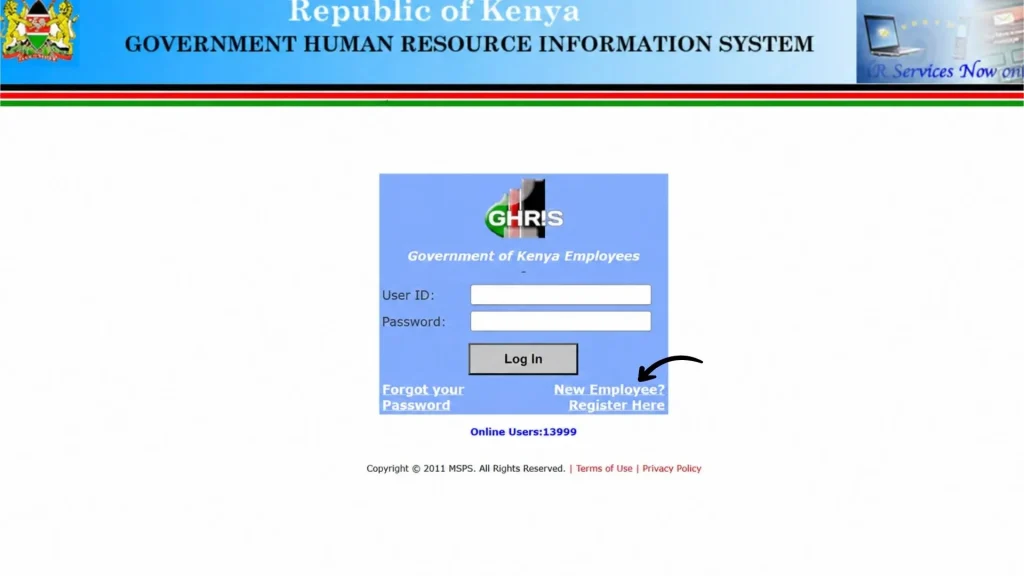
Once the GHRIS login page opens, look below the login form for the “New Employee? Register Here” option. Click on it.
Important:
Look for the registration link at the bottom of the login page. If you don’t see it, try refreshing the page or clearing your browser cache.
3
Now enter your details. The registration form requires information that matches your official government employment records. Depending on the current registration form, you are asked to provide details such as:
Personal Number
National ID Number
KRA PIN
Name
Date of Birth
Gender
Date of first appointment
Terms of Service
Mobile Number
Personal Email
Password
Security Note:
Create a strong password. Avoid using simple information in your password and keep your account secure
Strong Password Requirements:
4
Before submitting the registration form, carefully check all the information you entered.
5
After checking your details, submit the registration form. Click the submit button.
For a complete step-by-step guide, read our blog on UHR Payslip Registration.
Login Guide
UHR Payslip Login: Access Your Payslips Online
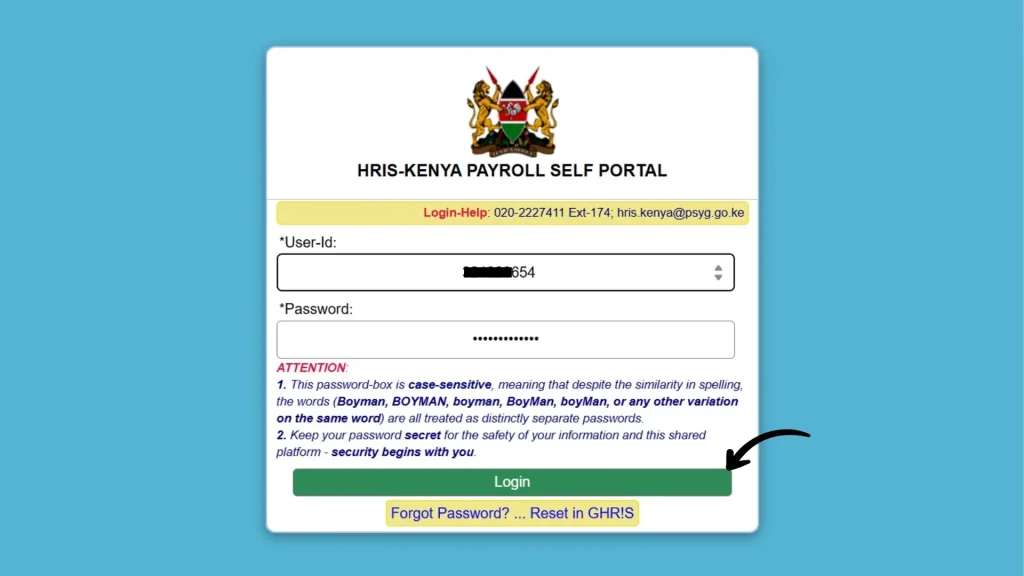
If you’re looking for my payslip online login, use the official UHR portal to access the available employee services. Use these steps:
1
Open the UHR Payslip Login Page
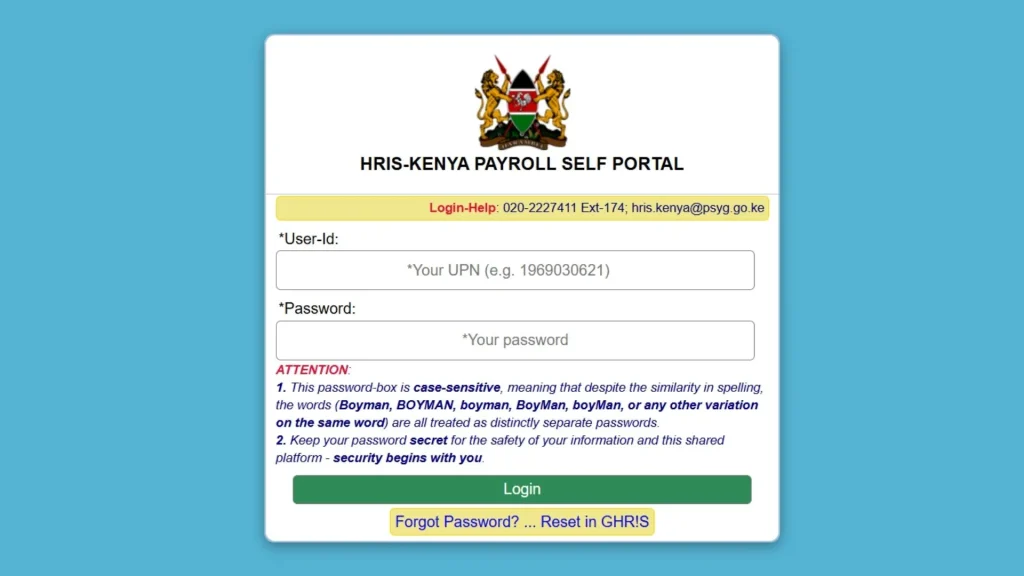
Open the official UHR/HRIS-Kenya Payroll Self Portal. For faster access, click this link:
uhr.kenya.go.ke payslip
2
Enter Your User ID and Password
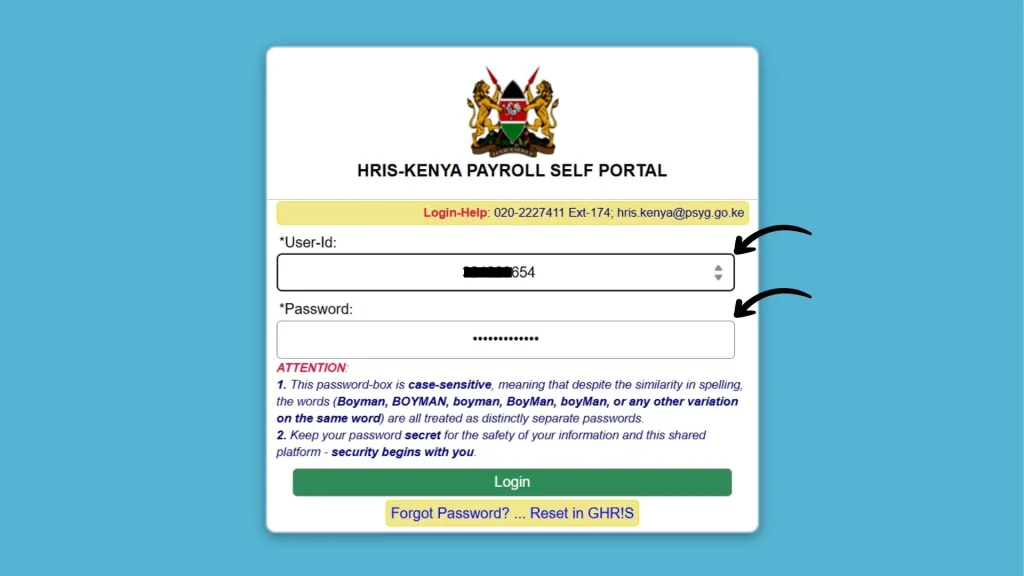
Enter your User ID/UPN and password to access your UHR Kenya payroll account.
3
Click on the login button
After entering your login details, make sure everything is correct. Then, click the Login button to access your dashboard.
Payroll Authorities
Which Government Departments Oversee UHR Payroll?
Several government institutions play a role in overseeing and supporting the UHR payroll system, including:
Government of Kenya
Provides overall authority and governance for public service payroll systems.
Public Service Commission (PSC)
Oversees public service and is the lead agency for human resource policies and employee management.
Ministry of Public Service / National Treasury
Works alongside payroll and HR systems to support salary processing, budgeting, and public service payroll coordination.
Online Access
How to check payslip online
To view your payslip, follow these steps:
After logging in, find the employee records or payroll section. It’s available under the My Records section. Open it.
After that, select the desired month and year, or choose the current.
Now, click View Payslip to open the salary details. You can check your current payslip, including your deductions, allowances, and net salary.
Payslip Details
What Information Is on a UHR Payslip?
A payroll payslip can look complicated at first. Understanding each section makes it easier to check whether your salary has been calculated correctly.
Employee Information
The first part identifies the employee. It can contain information such as:
If your personal or employment information appears incorrect, contact your HR or payroll office.
Basic Salary
The basic salary is the main salary associated with your position before allowances and deductions are considered.
Do not confuse it with the amount deposited into your bank account.
Allowances
Allowances are additional payments that can be available depending on your job, location, employment terms, or eligibility.
Gross Salary
Your gross salary represents your earnings before deductions. In a simplified calculation.
Basic salary + applicable allowances = Gross earnings
Deductions
Deductions are amounts taken from your earnings before your final net salary is paid.
These can include items such as:
The deductions shown on your payslip depend on your individual circumstances.
Net Salary
Your net salary is the amount remaining after applicable deductions have been taken from your earnings. A simplified formula is:
Gross earnings − total deductions = Net salary
Download Guide
How to Download UHR Payslip as a PDF
Many employees prefer keeping a PDF copy of their payslip because it is easy to store and send when an organization requests proof of income. Follow the steps:
1
Log in to your UHR portal
2
Open the payslip section
3
Select the month
4
Open the salary statement
5
Click the Download button
6
Save the file to a secure folder
Payslip_Sep2026.pdf
245 KB
Download Complete
100%
Detailed Guide
For a complete step-by-step guide, check out How to Download UHR Payslip Online in Kenya. The guide shows you how to access, view, download, and print previous payslips.
Password Recovery
What If You Forgot Your UHR Payslip Password?
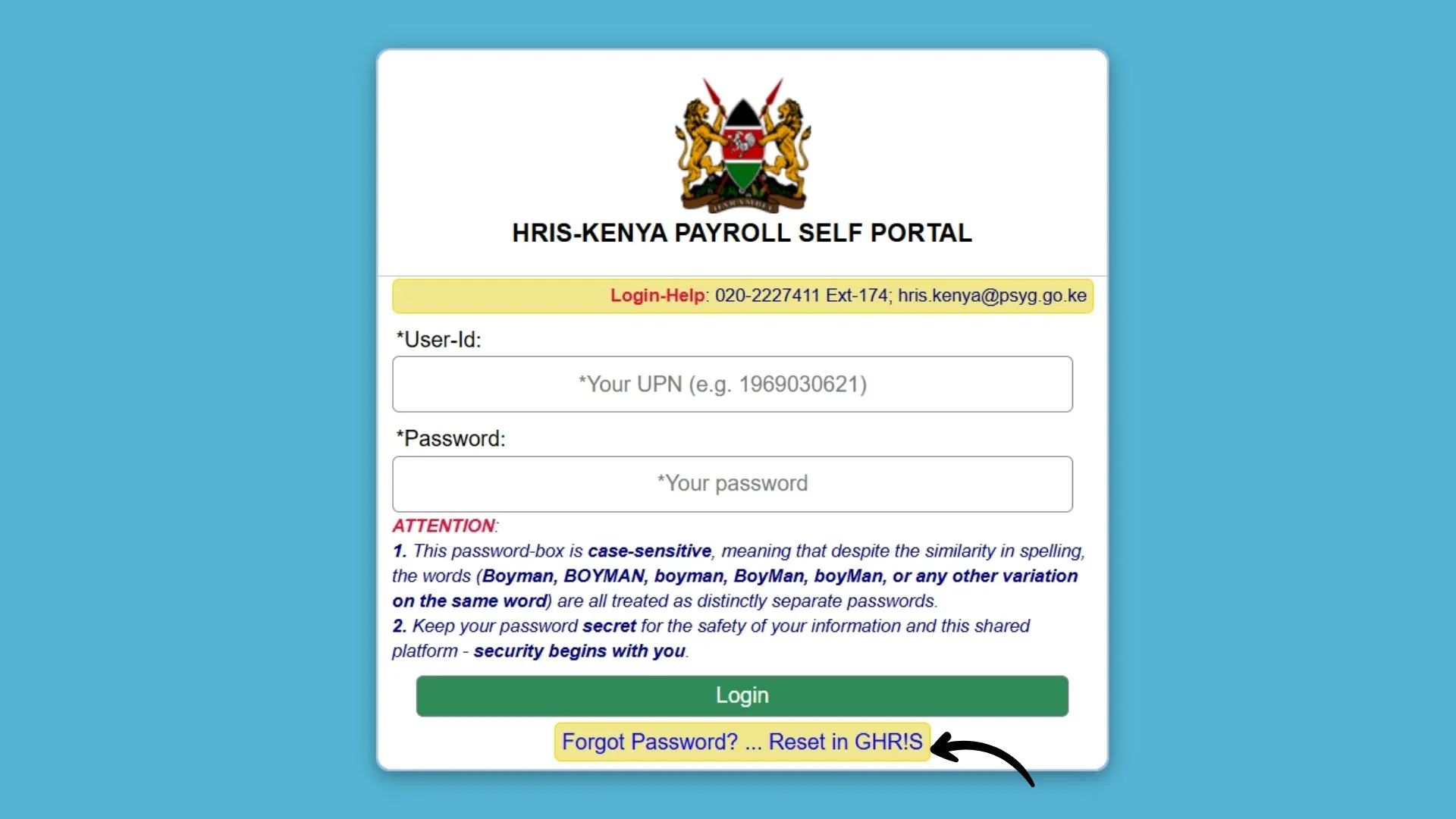
If you have forgotten your UHR payslip login password, you can reset it via the GHRIS password reset option on the official UHR Portal.
Important Notice
Password reset must be done through the GHRIS portal for security verification. Follow the steps below carefully.
1
Open the official UHR Portal and go to the login page.
2
Click the “Forgot Password? Reset in GHR!S” option on the login page.
3
Follow the instructions on the GHRIS page to reset your password.
4
Create a new password according to the system requirements.
5
Return to the UHR Payroll Self Portal and log in using your new password.
For a complete step-by-step guide, read our blog on Reset UHR Payslip password.
ghris.go.ke
Forgot Password?
Click here to reset your password
Secure Reset Process
Email Verification
Password Security Tips
Use Strong Passwords
Combine letters, numbers, and symbols
Keep It Private
Never share your password with anyone
Change Regularly
Update your password every 3-6 months
Avoid Common Words
Don’t use easily guessable information
Key Differences
UHR Payslip vs GHRIS Payslip: What’s the Difference?
GHRIS stands for Government Human Resource Information System, while UHR refers to Unified Human Resource.
GHRIS is the broader government HR platform used for various employee and human resources services, while UHR/HRIS Kenya Payroll Self Portal is primarily focused on payroll services, including access to payslips and salary information.
In simple terms, GHRIS handles wider HR functions, while UHR provides payroll-focused self-service access.y
This is why you may see terms such as uhr ghris payslip, uhr kenya payslip login, and government payslip used when searching for the same general payroll access process.
Troubleshooting
Why Is My UHR Payslip Not Showing?
Several reasons may prevent your latest salary statement from appearing.
Payroll May Not Be Processed Yet
If the current month’s payroll has not been finalized or the payslip has not been published, it cannot be available.
You Selected the Wrong Month
Check the pay period carefully before assuming that your payslip is missing.
Your Employee Record May Need Updating
Changes to your employment information, transfer, department, or payroll record can sometimes require HR intervention.
Technical Problems
The salary slip portal can temporarily experience technical issues.
Try:
Contact HR or Payroll
If you still cannot find the payslip, your HR or payroll department is the best place to ask for help.
If you are experiencing broader login, loading, or access problems, see our guide on UHR payslip not working.
Solutions
Common UHR Payslip Problems and Their Solutions
Below are some of the common payslip portal problems and their solutions:
Problem
Solution
Cannot Log In
Check your credentials and use the official password recovery option
Forgot password
Use the official recovery process
Payslip not visible
Check the selected month and payroll status
Page is not loading
Refresh the page or try another browser
Download is not working
Try the print/PDF option
Salary looks incorrect
Compare it with your previous payslip and contact payroll
Unexpected deduction
Review the deduction details and ask payroll for clarification
Old payslip missing
Ask HR whether historical records are available
Employee details are wrong
Contact your HR department
Account remains inaccessible
Contact your organization’s designated HR/system support
Support & Help
UHR Payslip Help and Support Contacts
If you face problems with your UHR payslip, such as login errors, forgotten credentials, or technical issues, contact the relevant government HR support team for assistance.
Phone Support
Available for assistance
020-2227411 (Ext-174)
For assistance with UHR/HRIS-related issues.
Email Support
Available for assistance
You can email the support team for help with login, payslip, or other HRIS-related concerns.
Before Contacting Support
To get help faster, make sure you have the necessary information ready.
Employee Details
Payroll number, National ID, and full name
Salary Period
The month or payslip period you’re asking about.
Error Details
Any error message or issue you’re experiencing.
Final Thoughts
Conclusion
The UHR payslip is an important document for public service employees because it provides a clear record of salary, allowances, deductions, and net pay.
As Kenya continues moving public service HR and payroll processes into digital systems, knowing how to find and understand your salary statement can save time and help you identify payroll issues early.
The basic process is simple: use the correct official access route, sign in with your authorized credentials, select the relevant pay period, review the online payslip, and download or print it when necessary.
Quick Answers
FAQs
Find answers to common questions about the UHR Payslip Portal
Important Notice
Disclaimer
This article is for informational purposes only and is not affiliated with the Government of Kenya, UHR, GHRIS, or any department. Our website provides general information and guidance to help users understand how this Payslip system works. It is not an official portal.
For official UHR Payslip access, please visit: